Simple PHP Server is a simple app that lets you setup and run your own PHP web server instantly.
With Simple PHP Server, you can setup a PHP web server in one minute!
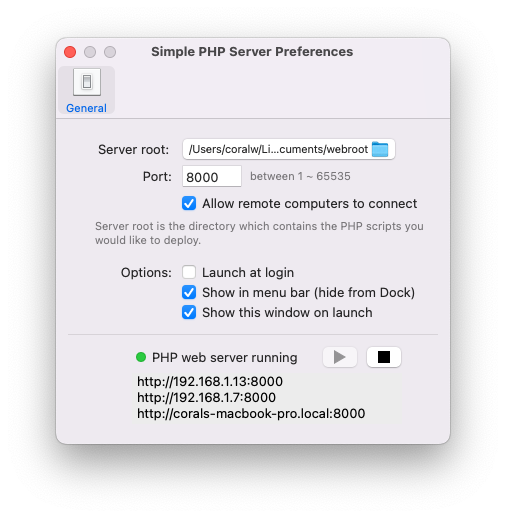
Here are the steps:
1. Launch Simple PHP Server.
2. Choose a directory (the server root) that contains your PHP scripts.
3. Start the PHP web server.
4. The HTTP URLs are displayed in the “Simple PHP Server Preferences -> General” tab, you can copy and paste a URL into your web browser to open it.
• Would like to run PHP locally? Get the PHP Runner app!

Hola Langui! Have you got a direcDL link your simple php server! would be sweet! 😉 TQ; Manny
Hi,
The link has been added.
Thank you!
Hi Langui. How can i update the PHP Version from PHP Version 8.0.10 -> PHP Version 8.5 ?? Thank you
Hi Matthias,
The latest version of Simple PHP Server supports external PHP binaries now.
You can specify the PHP path in “Simple PHP Server Preferences -> General”.
Thank you!